Redux、react-redux
redux
数据层的框架,解决react的数据传递问题。react的数据传递仅能在两个有关联的组件之间传递,如果第一层的组件要传递数据到第n层,就会很麻烦,所以需要一个数据层框架。 Redux = Reducer + Flux(最初的数据层框架)
图解
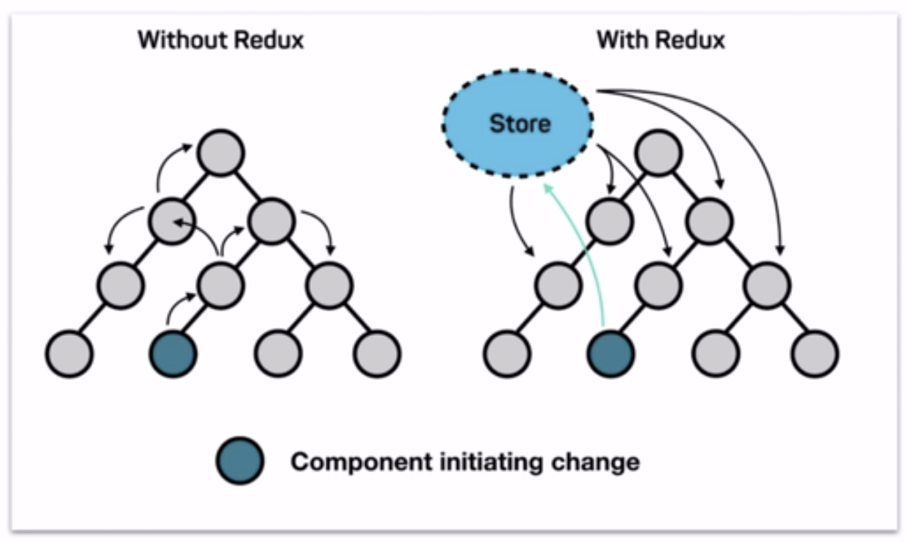
redux的工作流程:
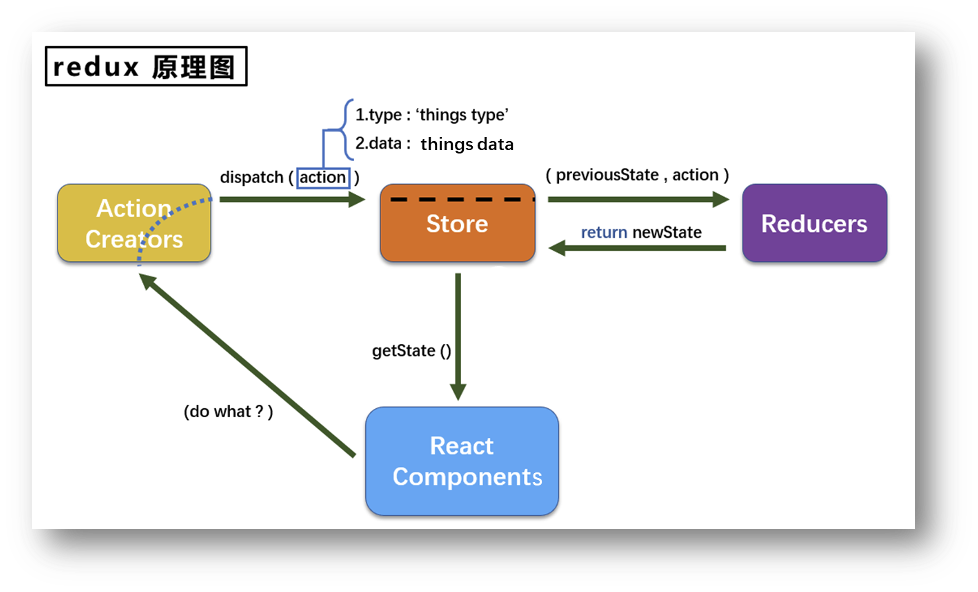
根据上图的工作流程,可以得到
redux的三个核心部分
用一个简单的例子来描述这三个核心部分:
React Component:借书的人(使用redux的组件)
Action Creators:借书的话(动作对象)
Store:图书馆(将state,action,reducer联系到一起的方式)
Reducers:记录书的本(用于初始化状态,加工状态的)
redux的工作流程:一个“借书的人” 说了一句“我要借书”的话,之后会在图书馆的“图书记录本”中查找书,找到了书就直接告诉借书的人
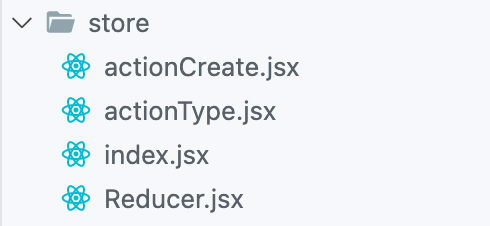
项目中的基本结构如上
import {
PLAYINGVOICE
} from '../constant'
export const createPlayingAction = data => ({type: PLAYINGVOICE, data})
|
export const PLAYINGVOICE = 'playingvoice'
|
import {
PLAYINGVOICE
} from '../constant'
var playingVoice = {voice: {path: '', desc: ''}}
export default function playerReducer(preState = playingVoice, action){
const { data, type } = action
if(type === PLAYINGVOICE){
preState = Object.assign(preState, {voice: data.onevoice})
}
return newState;
}
|
import reducer from './Reducer.jsx'
const store = createStore(reducer);
export default store
|
import React, { Component } from 'react'
import { deleteitem, } from './store/actionCreate'
import store from './store'
class ListItem extends Component{
constructor(props){
super(props);
this.state={isFinished: false}
this.deleteItem=this.deleteItem.bind(this);
}
componentDidMount(){
store.subscribe(() => {
if(this.state.isFinished){
}else{
}
})
}
render(){
return (
<button id="deleteBtn" onClick={this.deleteItem}>删除</button>
);
}
deleteItem(){
const action = deleteitem(this.props.data.id);
store.dispatch(action);
}
export default ListItem;
|
上面演示了,在组件中redux的简单使用
redux中的一些API
combineReducers({}) 将多个Reducer拼接成一个大的reducer
react-redux
Context
useContext
上下文,作为组件间传递数据使用,一般要配合两个 Hook,useContext和 useReducer
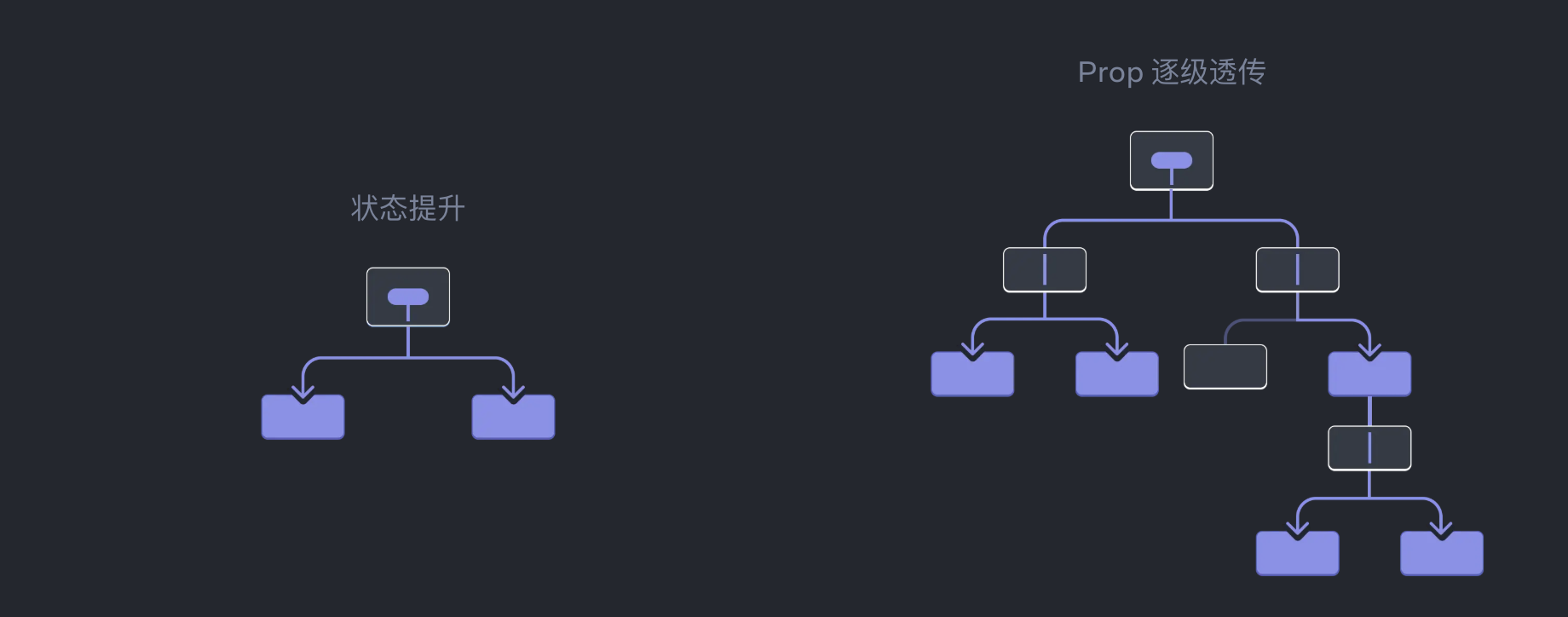
一般组件如果跨层级,传递数据是一个有点麻烦的问题,见上图
使用也很简单,就是使用创建出来的 context组件来包裹住需要使用上下文数据的组件
import { createContext } from 'react';
export const LevelContext = createContext(0);
import { LevelContext } from './LevelContext.js';
export default function Section({ children, isFancy }) {
const level = useContext(LevelContext);
return (
<section className={
'section ' +
(isFancy ? 'fancy' : '')
}>
<LevelContext value={level + 1}>
{children}
</LevelContext>
</section>
);
}
|
老的教程中会使用 Consumer来消费上下文,这种方式已经不被官方文档推荐 文档
useRecuder
这个Hook是用来提交数据到 context的,相当于修改数据,使用也很简单,使用 useReducer
import { useReducer } from 'react';
export function TasksProvider() {
const [tasks, dispatch] = useReducer(
tasksReducer,
initialTasks
);
return (
<button onClick={dispatch({
type: 'added',
text: 'foo',
})}>
Add Tasks
</button>
);
}
function tasksReducer(tasks, action) {
switch (action.type) {
case 'added': {
return [...tasks, {
text: action.text,
done: false
}];
}
default: {
throw Error('Unknown action: ' + action.type);
}
}
}
const initialTasks = [
{ id: 0, text: 'Philosopher’s Path', done: true },
{ id: 1, text: 'Visit the temple', done: false }
];
|
官方提供的 context和 reducer其实和 redux 中的概念很相近,所以很好理解