学习呦
17 11月 2025 13 min read

响应式原理

Written by 米豆

响应式原理

概念

何为响应式?不需要手动实现,当数据变化时,手动控制页面显示内容的变化。只关注定义数据,数据改变后的结果,至于页面渲染的改变则不需要我们手动处理,交给vue框架处理,此类似声明式编程

思路

  1. 创建普通数据肯定无法实现响应式,要创建响应式数据
    // ref()
    class RefImpl<T = any> {
    _value: T
    private _rawValue: T

    dep: Dep = new Dep()

    constructor(value: T) {
    this._value = value
    }

    get value() {
    this.dep.track()
    return this._value
    }

    set value(newValue) {
    const oldValue = this._rawValue
    if (hasChanged(newValue, oldValue)) {
    this._rawValue = newValue
    this._value = newValue
    this.dep.trigger()
    }
    }
    }

    // reactive()
    function createReactiveObject(
    target: Target,
    ) {
    if (!isObject(target) || isProxy(target)) {
    return target
    }
    const existingProxy = proxyMap.get(target)
    if (existingProxy) {
    return existingProxy
    }
    const proxy = new Proxy(
    target,
    targetType === TargetType.COLLECTION ? collectionHandlers : baseHandlers,
    )
    proxyMap.set(target, proxy)
    return proxy
    }

上面是vue3的ref、reactive响应式变量的简化源码,ref变量自己实现了依赖收集、依赖更新函数的执行。reactive则是使用Proxy创建了代理对象,来拦截对象属性访问等操作

依赖收集

依赖

使用到或者说要读取响应式数据的地方,有可能是一个函数里(比如watchEffect、watch中的回调),有可能是页面的模板(页面的模版中使用)。这些代码运行的范围都是依赖

收集

vue的运行时中,会有一个记录依赖的数据结构,比如WeakMap。WeakMap正好需要对象作为键,上面的ref和reactive都返回的是对象
WeakMap的值,watchEffect、watch依赖收集是你提供的回调,模板中依赖收集则为vue生成的一个能更新页面dom内容的回调。官方统称为副作用函数

副作用执行

响应式数据更新后,收集的依赖副作用函数要全部执行(一个响应式数据可能会有多处读取他值的依赖,所以这些副作用函数都得执行)

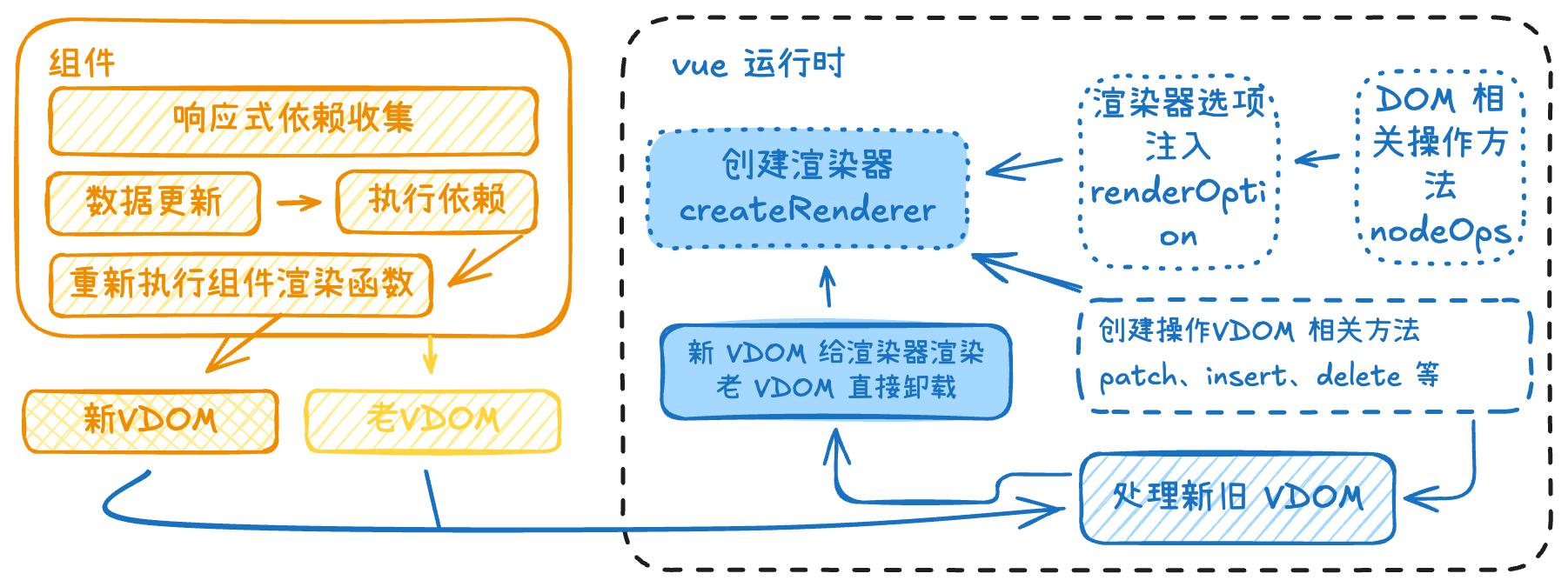
流程图

一个 vue 组件如何响应式更新组件内部数据的及视图的
watch、watchEffect

watch

用法

监听一个响应式数据,如果响应式数据有变化,就会触发绑定的回调函数

参数说明

watchAPI可以监听响应式对象(reactive、ref),可以监听一个数组(数组中也是响应式对象组成的),可以监听一个getter函数(用于监听一个响应式对象中的某个属性)

精简源码

export function watch(
source: reactiveObject,
cb?: Function,
options: WatchOptions,
): WatchHandle {
// 这里就是包装了我们传入watch的回调
// 先判断newValue和oldValue有没有改变
// 如果有改变就要执行我们传入的回调函数
// 之后把新值和旧值都传入进我们提供的回调中
const job = () => {
if (cb) {
const newValue = effect.run()
if (
hasChanged(newValue, oldValue)
) {
try {
const args = [
newValue,
// pass undefined as the old value when it's changed for the first time
oldValue === INITIAL_WATCHER_VALUE
? undefined
: isMultiSource && oldValue[0] === INITIAL_WATCHER_VALUE
? []
: oldValue,
boundCleanup,
]
oldValue = newValue
call
? call(cb!, WatchErrorCodes.WATCH_CALLBACK, args)
: // @ts-expect-error
cb!(...args)
}
}
} else {
// watchEffect
effect.run()
}
}

// 定义一个调度器,传入处理好的getter函数
effect = new ReactiveEffect(getter)

// 这一步是把副作用函数给watch调度器,让调度器选择合适的时机执行副作用函数
effect.scheduler = (job as EffectScheduler)
}

说明

调度器:当依赖变化,就要触发更新函数,但对于频繁触发的变化,要用调度器实现节流

watchEffect

用法

提供一个回调函数,同步回调会追踪其内部依赖,异步回调会追踪其第一个await前的依赖

参数说明

提供一个函数,可以是同步函数,也可以是异步函数。会在执行期间自动收集响应式依赖

精简源码

其实底层还是走watch那一套,watch(源码层面,非我们直接调用的接口)的第一个参数可以接收一个函数(非getter函数),这不正是watchEffect实现的

export function watch(
source: WatchEffect
): WatchHandle {
if (isRef(source)) {
// ...
} else if (...) {
// ...
} else if (isFunction(source)) {
getter = () => {
if (cleanup) {
pauseTracking()
try {
cleanup()
} finally {
resetTracking()
}
}
const currentEffect = activeWatcher
activeWatcher = effect
try {
return call
? call(source, WatchErrorCodes.WATCH_CALLBACK, [boundCleanup])
: source(boundCleanup)
} finally {
activeWatcher = currentEffect
}
}
}
}

vue2 响应式原理(已过时)

export class Observer {
dep: Dep

constructor(public value: any) {
// this.value = value
this.dep = new Dep()
def(value, '__ob__', this)
if (isArray(value)) {
if (!shallow) {
this.observeArray(value)
}
} else {
const keys = Object.keys(value)
for (let i = 0; i < keys.length; i++) {
const key = keys[i]
defineReactive(value, key)
}
}
}

observeArray(value: any[]) {
for (let i = 0, l = value.length; i < l; i++) {
new Observer(value[i])
}
}
}

function defineReactive(
obj: object,
key: string,
val?: any,
) {
const property = Object.getOwnPropertyDescriptor(obj, key)

Object.defineProperty(obj, key, {
enumerable: true,
configurable: true,
get: function reactiveGetter() {
const val = property.getter
dep.depend()
return val
},
set: function reactiveSetter(newVal) {
const val = property.getter
val.value = newVal
dep.notify()
}
})
}

vue2底层实现为Object.defineProperty

↑