状态管理工具,可以实现组件间共享状态(也就是组件间状态通信)的功能,同时可以在状态变化时通知注册的回调,执行一些我们指定的操作
vuex 前言 题外话:什么时候使用Vuex?也许并不需要使用vuex
多个组件依赖于同一个状态
来自不同组件的行为要变更同一个状态
共享状态
但是,如果要完成组件间的状态共享,可以用很多其他的方式,比如手动实现一个极简的 store,注册到 vue 的实例对象上,也可以实现共享
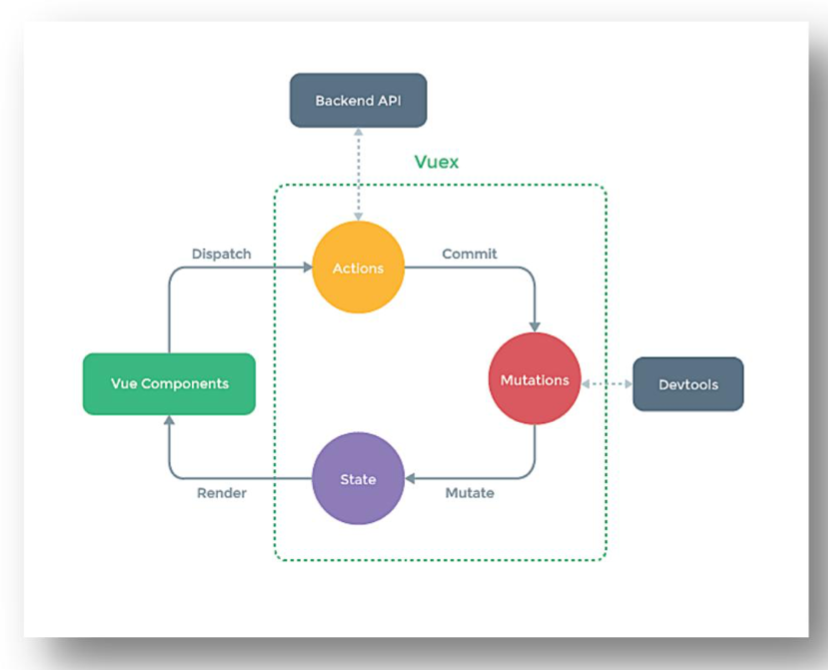
原理图
vuex中的概念 术语解释 state :vuex下面的一个公共的state,或者说是“单一状态树”,表示整个项目的所有状态
getter :state状态的获取器,可以对状态做一些处理操作(比如过滤等)并返回操作后的结果状态
action :负责接收组件派发的事件,如果组件派发的事件仅有事件的类型,没有具体的值。具体的值需要从其他的后端API(也就是图中的Backend API)、获取或者做数据的加工,那么就需要action拿到这个值,之后commit给mutations,也可以直接返回值给调用的组件
mutations :拿到对应的事件类型和值,来对state进行处理。mutation对象里的方法不能有返回值,返回值拿不到数据,仅仅可以操作模块里面的数据
store :上面几个部分的管理者
module :模块,可以理解为小的 store,从 store中拆分出来的部分。模块中可以开启 namespace: true的选项,表示开启命名空间,命名空间的名称为“模块对象”的名字
白话vuex vc(顾客)要点餐,点的菜名(dispatch派发的事件类型和数据),服务员(action)拿到了顾客点的菜之后就提交(commit)给后厨(mutations)后厨负责拿到顾客要的菜后做菜(拿到事件类型和值进行处理),之后做好的菜(state)给顾客(state数据给到对应的组件,会重新渲染组件)
代码实现(基础) import Vue from 'vue' import Vuex from 'vuex' Vue .use (Vuex )const actions = { jiaOdd (context,value ){ console .log ('actions中的jiaOdd被调用了' ) if (context.state .sum % 2 ){ context.commit ('JIA' ,value) } } } const mutations = { JIA (state,value ){ console .log ('mutations中的JIA被调用了' ) state.sum += value } } const state = { sum :0 } export default new Vuex .Store ({ actions, mutations, state, })
注意: 上面的action中的 jiaOdd中接收了一个context,这个对象身上带有commit、dispatch等方法,也有state可以在dispatch中做一些判断。但注意context对象并不是store实例
export default { name :'Count' , data ( return { n :1 , } }, methods : { increment ( this .$store .commit ('JIA' ,this .n ) }, incrementOdd ( this .$store .dispatch ('jiaOdd' ,this .n ) } }, mounted ( console .log ('Count' ,this ) }, }
store中的方法 getter 用于派生state数据,派生出来的数据可以做其他的操作
getters : { doneTodosCount (state, getters) { return this .$store .state .todos .filter (todo =>done ).length } }
接收state,有时候可以接收第二个参数getter(和上面的dispatch中的context对象中的dispatch方法差不多,可以继续使用对应的dispatch或者getter
dispatch 用于触发对应的 action
dispatch (type : string, payload?: any, options?: Object ): Promise <any>dispatch (action : Object , options?: Object ): Promise <any>
commit 用于触发对应的 mutation
commit (type : string, payload?: any, options?: Object )commit (mutation : Object , options?: Object )
subscribe 每一个 mutation执行完毕后,执行传入的 handler函数
subscribe (handler : Function , options?: Object ): Function
subscribeAction 每一个 action执行前,都会执行传入的 handler函数
subscribeAction (handler : Function , options?: Object ): Function
watch 监听第一个参数(第一个参数是一个函数)的返回值,返回值有变化,执行第二个传入的参数(也是一个函数)
watch (fn : Function , callback : Function , options?: Object ): Function
vue组件中使用的辅助函数 mapState和mapGetter mapState:将store中的state映射到组件的计算属性上。
computed :{ sum ( return this .$store .state .sum } ...mapState (['sum' ,'school' ,'subject' ]), }
mapGetters和上面的用法一致
mapMutations和mapActions methods : { increment ( this .$store .commit ('JIA' ,this .n ) }, ...mapMutations ({increment :'JIA' ,decrement :'JIAN' }), }
vuex模块化 单一的状态树会在项目中越来越大,越来越臃肿。所以可以将单一的store分割成多个store 每个模块拥有自己的 state、mutation、action、getter、甚至是嵌套子模块——从上至下进行同样方式的分割
const moduleA = { namespaced :true , state :{ sum :0 , school :'尚硅谷' , subject :'前端' , }, mutations : { JIA (state,value ){ console .log ('mutations中的JIA被调用了' ) state.sum += value } }, actions : { jiaWait (context,value ){ console .log ('actions中的jiaWait被调用了' ) setTimeout (()=> { context.commit ('JIA' ,value) },500 ) } }, getters :{ bigSum (state ){ return state.sum *10 } } } const moduleB = { namespaced :true , state : { personList :[{id :'001' ,name :'张三' }] }, mutations : { ... }, actions : { ... } } const store = createStore ({ modules : { countAbout : moduleA, personAbout : moduleB } }) store.state .a store.state .b <h1>当前求和为:{{sum}}</h1> <h3 > 当前求和放大10倍为:{{bigSum}}</h3 > <h3 > 我在{{school}},学习{{subject}}</h3 > computed : { ...mapState ('countAbout' ,['sum' ,'school' ,'subject' ]), ...mapState ('personAbout' ,['personList' ]), ...mapMutations ('countAbout' ,{increment :'JIA' }), ...mapActions ('countAbout' , {incrementWait :'jiaWait' }) }, methods : { add ( const personObj = {id :nanoid (),name :this .name } this .$store .commit ('personAbout/ADD_PERSON' ,personObj) } }
Pinia 作用和 vuex 一致,都是为了组件间共享状态。但是vuex5 开发团队已经把 pinia 作为 vue 的主要状态管理工具,且 pinia 基本就是从 vuex5 的概念里做出来的,换了个名字
为什么要选pinia 老生常谈的问题,第一个 composition API,更佳复合 vue3 的官方写法规范,第二,不在需要 mutation,那么如何操作 store中的状态呢?直接暴露出来操作就可以,pinia 返回的是响应式数据,就和在组件中定义的响应式数据一致,所以,在组件中如何使用,就如何使用 pinia 暴露出来的 statesubscribe等 API,如果需要触发回调函数,直接监听 state即可,且也没有命名空间,模块等概念了,因为不需要。而且,对 ts 支持很好
方法 defineStore import { defineStore } from 'pinia' export const useAlertsStore = defineStore ('alerts' , { })
这里要⚠️注意,导出的名称最好都已 use开头,符合 vue composition API 的命名规范
传入的第一个参数,仅仅是作为在 devtool 中使用的唯一 id,所以必须要填写
defineStore 的 options 有:
下面来一个一个说明
state 定义 store中用到的状态
export const useCounterStore = defineStore ('counter' , { state : () => ({ count : 0 , name : 'Eduardo' }) }) export const useCounterStore = defineStore ('counter' , { const count = ref (0 ) const foo = reactive ({bar : '' }) return { count, foo } })
mapState()和 mapWritableState() 在选项式 API 中使用,映射出只读的状态,注意⚠️不可修改的
import { mapState } from 'pinia' import { useCounterStore } from '../stores/counter' export default { computed : { ...mapState (useCounterStore, ['count' ]) ...mapState (useCounterStore, { myOwnName : 'count' , double : store =>count * 2 , magicValue (store ) { return store.someGetter + this .count + this .double }, }), }, }
如果需要映射可以修改的属性,要使用 mapWritaleState方法
import { mapWritableState } from 'pinia' import { useCounterStore } from '../stores/counter' export default { computed : { ...mapWritableState (useCounterStore, ['count' ]), ...mapWritableState (useCounterStore, { myOwnName : 'count' , }), }, }
$subscribe() 此方法是监听 state的变化,如果变化,执行传入的回调,也就是 vuex 中的 mutation执行后执行
cartStore.$subscribe((mutation, state ) => { })
getter 类似组件中的 computed,对状态做二次处理,派生新状态的,和 vuex 类似
export const useCounterStore = defineStore ('counter' , () => { const doubleCount = computed (() => count.value * 2 ) return { doubleCount } }) export const useCounterStore = defineStore ('counter' , { state : () => ({ count : 0 }), getters : { doubleCount : (state ) => state.count * 2 , } })
action 类似组件中的 methods,可以写一些方法,也可以像 vuex 一样处理请求逻辑,也可以写一下业务逻辑
export const useCounterStore = defineStore ('counter' , () => { function increment ( count.value ++ } return { increment } }) export const useCounterStore = defineStore ('counter' , { state : () => ({ count : 0 }), actions : { increment ( this .count ++ }, }, })
mapActions() 这个方法是在选项式写法中使用的,和 vuex 的同名方法作用一致
import { mapActions } from 'pinia' import { useCounterStore } from '../stores/counter' export default { methods : { ...mapActions (useCounterStore, ['increment' ]), ...mapActions (useCounterStore, { myOwnName : 'increment' }), }, }
$onAction() 类似于 vuex 的 subscribeAction,订阅 action,函数签名如下
const unsubscribe = someStore.$onAction( ({ name, // name of the action store, // store instance, same as `someStore` args, // array of parameters passed to the action after, // hook after the action returns or resolves onError, // hook if the action throws or rejects } ) => const startTime = Date .now () console .log (`Start "${name} " with params [${args.join(', ' )} ].` ) after ((result ) => { console .log ( `Finished "${name} " after ${ Date .now() - startTime } ms.\nResult: ${result} .` ) }) onError ((error ) => { console .warn ( `Failed "${name} " after ${Date .now() - startTime} ms.\nError: ${error} .` ) }) } ) unsubscribe ()
storeToRefs 解构从 store 中返回的响应式数据
<script setup> import { useCounterStore } from '@/stores/counter' import { storeToRefs } from 'pinia' const store = useCounterStore ()const { name, doubleCount } = storeToRefs (store)const { increment } = store</script>
响应式数据的状态需要使用上面的 API 去解构,但是 action 方法就不需要
插件 plugin 插件可以添加属性、store的选项 Options 到到每一个 store 上
import { createPinia } from 'pinia' function SecretPiniaPlugin ( return { secret : 'the cake is a lie' } } const pinia = createPinia ()pinia.use (SecretPiniaPlugin ) const store = useStore ()store.secret