React基础
React基础
基础
JSX 语法
const element = <h1>Hello, {name}</h1> |
JavaScript和UI代码的结合 用{}包裹表达式(js表达式,变量)
const element = <img className={imgClass} src={user.avatarUrl} /> |
class属性写为className
属性用小驼峰语法
const element = <h1>Hello, {name}</h1> |
一个可运行的React Hello World例子 在React中,碰到标签会以html解析,碰到{}会以JavaScript解析
渲染一个React组件使用 ReactDOM.render(element, container[, callback])
createElement方法
JSX 会转换为 React.createElement方法调用
// 函数签名 |
会创建一个 react 元素,类似 vue 的 h函数创建 vue 中的 VNode
// 使用 createElement 函数 |
组件
- 类式组件
- 函数式组件
function MyComponent(){ |
插入组件使用import,使用组件用 开头大写 的标签,组件可嵌套
import Hello from './components/Hello' |
渲染组件,ReactDOM的使用
ReactDOM.render( |
组件上的props和state
组件接收的入参为props,组件自身的状态为state
props
组件身上的标签属性(也就是这个组件接收的参数)都会存放到组件的props属性上
function Welcome(props) { |
传值
const el = <Welcome name="嘉然" /> |
传入值的类型检查,PropTypes的使用
Welcome.propTypes = { |
默认值,defaultProps的使用
Welcome.defaultProps = { |
props不可修改
State
函数式组件需借助Hooks使用state,类式组件可以直接使用state。 state是一个对象的形式
class Weather extends React.Component{ |
不可以直接修改state,使用setState()修改 this.setState({isHot:!isHot})
使用setState(stateChange||updater, [callback])需要注意:
不要在一些生命周期函数中使用,会引起死循环
更新是异步的,如果要实现同步更新,setState要接收一个函数
callback会在组件状态和界面都更新后才会被调用
如果新状态不依赖于原状态 ==> 使用对象方式
如果新状态依赖于原状态 ==> 使用函数方式
如果需要在
setState()执行后获取最新的状态数据, 要在第二个callback函数中读取
useState
[useState Hook](./Hooks.md###State Hooks)
四、事件处理
- 事件处理回调
Ref
类式组件里,在回调函数中要注意this指向的问题
class Toggle extends React.Component { |
上面的写法还有其他的形式,可以不用bind来绑定,bind涉及到作用域,参考javascript部分
class LoggingButton extends React.Component { |
上面到写法就是不需要使用bind绑定到写法
函数式组件的事件绑定如下
function ActionLink() { |
Ref 访问DOM的方法,即为一个DOM的引用 创建一个Ref
React.createRef()创建的是ref对象回调形式的Ref
String类型的Ref(已经过时,不再使用)
从上到下依次是三种使用Ref的例子
class MyComponent extends React.Component { |
当在html元素上使用ref,ref对象接收的是底层DOM元素,放到其current属性上
当ref用于class组件上时,ref对象接收的是这个组件的实例,放到其current属性上
函数没有实例,不能将其放到ref上
回调形式的ref
class CustomTextInput extends React.Component { |
在组件挂载的时候,会执行ref的回调函数
在组件卸载的时候,也会调用ref的回调函数
五、虚拟DOM、真实DOM
虚拟DOM(文档称为 React 元素)
开销极小的普通对象
const Velement = <div>Hello, world</div>; |
真实DOM
const Relement = document.getElementById("root"); |
两者关系
调用
ReactDOM.render将虚拟DOM渲染成真实DOM,组件state改变时,React会创建新VDOM并生成RDOM虚拟DOM没有真实DOM过多的属性
Diff算法
[对象差异比对调和(Reconciliation)算法](./React Fiber.md)
- 虚拟DOM的比对
- 三种比对策略
Tree Diff:DOM树的同层比对,跨层时,直接创建新节点及节点下的树 Element Diff:节点在同一层级,会使用 删除、插入、移动 来更新插入
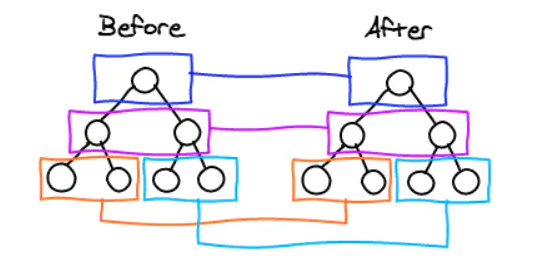
Component Diff:
不同类型组件:使用Tree Diff
同类型组件,比对 属性 - 子节点 子节点如根节点比对形式 属性 - 子节点 比对。碰到不同类型节点便使用Tree Diff规则。也可以使用 生命周期函数
shouldComponentUpdate()来手动控制组件更新不同类型组件
不同类型组件
<div> |
同类型组件
<div className="before" title="stuff" /> |
节点在同一层级,会使用 删除、插入、移动 来更新 插入
<ul> |
每个节点带有key,避免 一些破坏渲染顺序的操作引发的性能问题
<ul> |
根据key判断原节点是否在原VDOM中存在
为什么需要虚拟DOM
- 相较于 DOM 的体积优势和速度优势
- 多平台的渲染抽象能力
多平台渲染抽象能力
UI = f(state)这个公式进一步进行拆分可以拆分成两步:
- 根据自变量的变化计算出 UI
- 根据 UI 变化执行具体的宿主环境的 API
虚拟 DOM 只是多真实 UI 的一个描述,回头根据不同的宿主环境,可以执行不同的渲染代码:
- 浏览器、Node.js 宿主环境使用 ReactDOM 包
- Native 宿主环境使用 ReactNative 包
- Canvas、SVG 或者 VML(IE8)宿主环境使用 ReactArt 包
- ReactTest 包用于渲染出 JS 对象,可以很方便地测试“不隶属于任何宿主环境的通用功能”
七、生命周期函数
生命周期钩子,特定时刻执行
- React16.4 旧生命周期
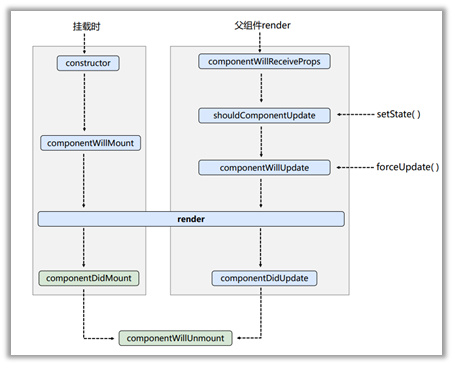
初始化阶段: 由ReactDOM.render()触发—初次渲染
constructor()componentWillMount()render()componentDidMount()
更新阶段: 由组件内部this.setSate()或父组件render触发
shouldComponentUpdate()componentWillUpdate()render()componentDidUpdate()
卸载组件: 由ReactDOM.unmountComponentAtNode()触发 componentWillUnmount()
- 新生命周期
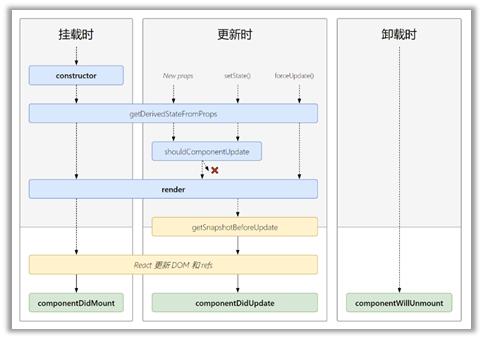
image.png
初始化阶段: 由ReactDOM.render()触发—初次渲染
constructor()getDerivedStateFromProps()render()componentDidMount()
更新阶段: 由组件内部this.setSate()或父组件重新render触发
getDerivedStateFromProps()shouldComponentUpdate()render()getSnapshotBeforeUpdate()componentDidUpdate()
卸载组件: 由
ReactDOM.unmountComponentAtNode()触发componentWillUnmount()
PS.手动控制组件更新
shouldComponentUpdate(){ |
八、官方脚手架
Create a New React App – React (reactjs.org) 安装 npm install -s create-react-app 使用 npx create-react-app myapp
九、网络请求
- axios
- fetch
axios
axios中文网 简单使用实例
axios.get(`/api1/users?q=${keyWord}`).then( |
fetch
MDN:WorkerOrGlobalScope.fetch() 实例
fetch.get(`/api1/users?q=${keyWord}`) |